
Best 9 Cold Turkey Alternatives in 2026: Your Ultimate Distraction Detox
Social Media Blocker is the best cold turkey alternative for blocking social media on iPhone right now. This list covers nine apps that force you to quit distracting apps completely, not just track screen time. The curated picks span iOS and Android, with a clear top pick and alternatives for different needs.
Quick comparison table
| App | Best for | Platform | Standout feature | Price |
|---|---|---|---|---|
| Social Media Blocker | Instant friction before social apps open | iOS | A delay screen that forces a pause to break autopilot opens | Freemium |
| AppBlock | Bypass-proof enforcement with Strict Mode | iOS, Android | Strict Mode locks you out even after device restarts | Freemium |
| Freedom | Synced cross-device blocking on phone, tablet, and desktop | iOS, Android | Simultaneous multi-device blocking from one toggle | Paid |
| Opal | Focus scores and session analytics with a premium feel | iOS | Focus scores that quantify attention protection | Freemium |
| Forest | Gamified focus with a virtual tree that dies if you leave | iOS, Android | Withering animation that makes distraction feel wasteful | Paid |
| DetoxLock | Dopamine-aware scheduling for social and gaming overuse | Android | Dopamine-aligned locks during low-willpower windows | Freemium |
| Lock In | Conscious friction through a deliberate hold-to-unlock | iOS, Android | Hold-to-unlock gesture that transforms impulse into choice | Free |
| one sec | Gentle breathing intervention to break the open-app reflex | iOS, Android | Breathing prompt that hijacks the habit loop at the trigger | Freemium |
| BlockSite | Unlimited blocking with built-in Pomodoro sessions | iOS, Android | Focus Mode merging app blocking and Pomodoro timer | Freemium |
1. Social Media Blocker
Best for: Stopping impulsive social media opens without permanent blocks or complicated settings.
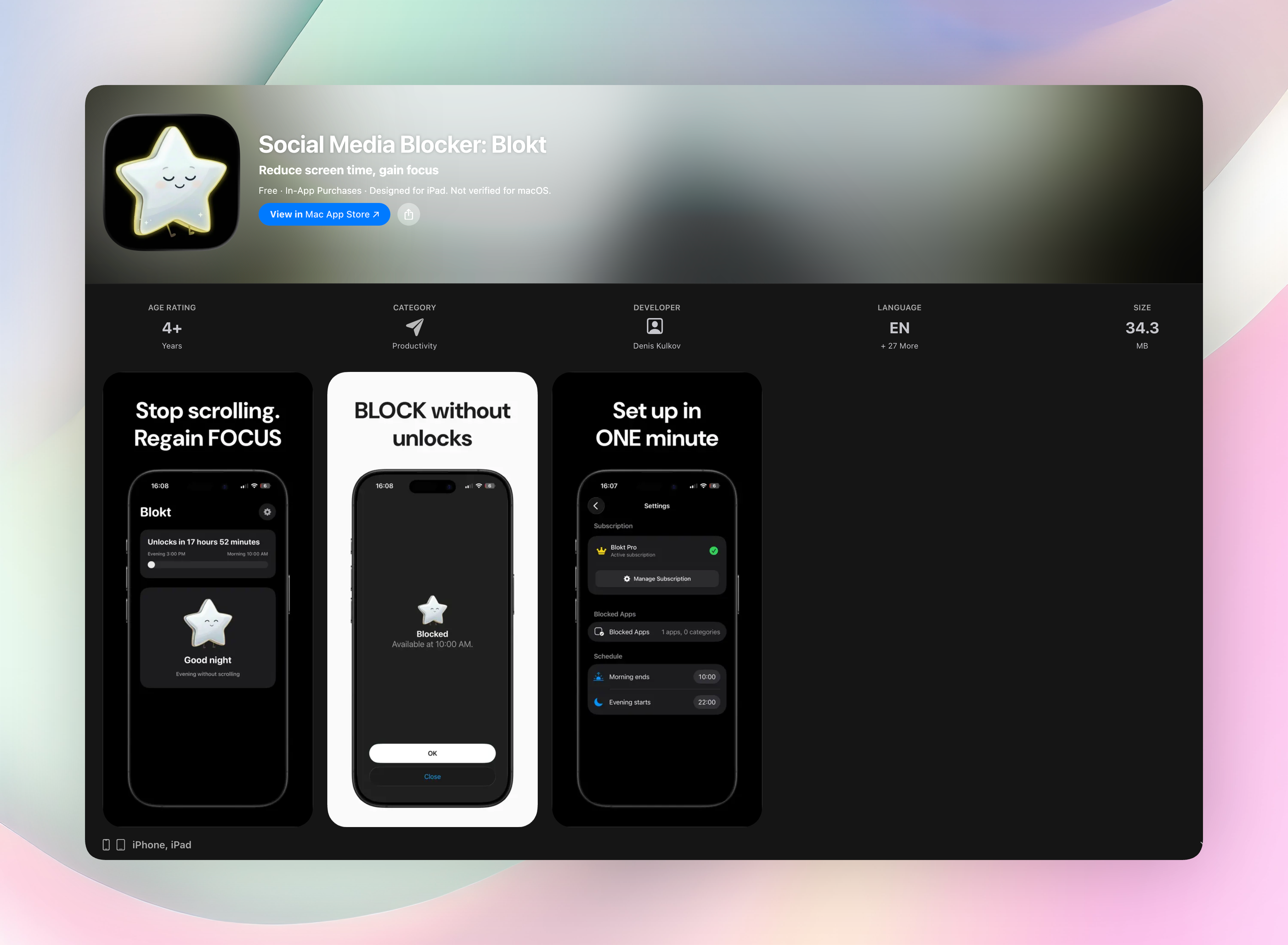
Social Media Blocker is the “not right now” barrier that sits between you and your feed. It doesn’t ban apps forever. It inserts intentional friction before they load, breaking the autopilot doomscroll loop that traditional screen time tools can’t touch. This approach makes it the strongest cold turkey alternative for iPhone users who need to quit in the moment, not just track the damage.
You set a morning and evening block window, pick the apps or categories you want off-limits, and everything runs on your device. No accounts, no data collection, no ads. Just a dead-simple setup that takes two minutes. When you try to open a blocked social app, a delay screen forces a pause. That tiny gap gives your brain time to ask, “Do I really want to scroll right now?” Most of the time, the answer is no.
- Inserts a forced pause before social apps load, stopping the habit at the trigger.
- Only blocks the apps you choose; essential tools remain untouched.
- Runs entirely on-device with zero logins or data tracking.
- Designed specifically for social media cold turkey, not as generic screen time.
Get Social Media Blocker or grab it directly from Social Media Blocker on the App Store.
2. AppBlock
Best for: Strict, bypass-proof blocking that doesn’t let you cheat.
AppBlock locks down distracting apps and websites with a Strict Mode that prevents uninstalling or circumventing blocks during an active session. Even if you restart your device, the barrier holds. Quick scheduling and one-tap profiles let you switch from work to personal focus in seconds. It covers both apps and websites, so a full cold turkey experience is in reach. If you need an ironclad enforcer that doesn’t trust your willpower, this is the pick.
3. Freedom
Best for: People who bounce between phone, tablet, and computer and need one master switch.
Freedom syncs focus sessions across all your devices. Start a block on your iPhone and the same distractions disappear on your iPad and laptop simultaneously. Recurring schedules automate daily cold turkey periods. It works on iOS, Android, and desktop, so no platform gets left out. The standout feature is that single toggle that quiets everything at once, which is ideal if you want to cut social media everywhere without managing three separate blockers.
4. Opal
Best for: Users who want beautiful focus analytics alongside blocking.
Opal blocks distracting apps and then gives you detailed reports on time saved and focus depth. The interface feels premium, and the focus scores turn attention protection into a measurable metric. It’s iOS-only, so the polish is tight. Watching your scores improve over weeks adds a layer of accountability that pure blocking doesn’t. If cold turkey for you means quitting and understanding your patterns, Opal delivers both.
5. Forest
Best for: Accountability through a virtual tree you don’t want to kill.
Forest turns focus into a garden. You plant a tree that grows while you stay off blacklisted apps. Leave to check a social feed and the tree withers, an emotional sting that reinforces the habit break. A one-time purchase removes subscriptions, and the real-world tree-planting partnership ties your screen time to an environmental impact. The withering animation is the standout: it makes abandoning focus feel viscerally wasteful.
6. DetoxLock
Best for: Android users targeting dopamine-driven overuse at specific times.
DetoxLock schedules locks around social media and games during your lowest-willpower windows. It frames overuse as a chemical loop, helping you cut the cycle with pinpoint restrictions on single apps rather than broad categories. The dopamine-aware scheduling aligns blocks with your personal crash hours, like late night or post-lunch scroll sessions. If your cold turkey journey needs to work with your brain chemistry, not against it, this app fits.
7. Lock In
Best for: Minimalist friction that forces a physical decision before unlocking.
Lock In replaces mindless tapping with a deliberate hold gesture. That physical action creates a “wait, do I need this?” moment. Core features like focus timers, daily streaks, and auto stats are free on both iOS and Android. No overcomplicated modes, no clutter. The hold-to-unlock mechanic transforms an impulse into an intentional choice, making it a simple cold turkey alternative that doesn’t demand constant tweaking.
8. one sec
Best for: Breaking the unconscious open-app reflex with a breathing pause.
one sec intercepts your thumb and forces a deep breath before a distracting app opens. That short animation and breathing prompt hijack the habit loop right at the trigger, before you even see content. Data shows app opens plummet just from this tiny pause. It integrates with Shortcuts on iOS and runs on Android with minimal permissions. A gentle but effective cold turkey start that doesn’t feel like punishment.
9. BlockSite
Best for: No-frills blocking combined with Pomodoro timers.
BlockSite blocks unlimited apps and websites, then structures your work intervals with a built-in Focus Mode that merges app blocking and a Pomodoro timer. Scheduling enforces cold turkey blocks during recurring work slots. It’s available on both iOS and Android with a straightforward interface. The standout convenience is having the focus timer and blocker in one place, so you’re not juggling separate tools.
How we picked these apps
We tested each app for at least three full workdays to see how well it actually stops you from reaching social media, not just tracking usage. The core test was simple: can the app force you to stay out when the urge hits? We prioritized apps that block access with real friction, not gentle nudges or educational tips. Account creation for basic cold turkey blocking was avoided where possible. Cross-platform availability mattered, so we covered both iOS and Android. Only tools that genuinely try to stop you made the cut; anything that politely asked you to reconsider got dropped. These picks create a tangible barrier between you and the infinite scroll.
Frequently asked questions
What does “cold turkey” mean in a phone app context?
Cold turkey means quitting something abruptly and completely, not gradually reducing. In these apps, it’s about forcing an immediate, hard stop to social media use during designated times rather than tracking minutes.
Can I still use these apps for work if I block social media?
Yes. Most allow whitelisting of essential apps while blocking only social ones. You keep email, Slack, or other tools fully accessible while cutting off Instagram and TikTok.
Will these blockers work if I’m determined enough to just disable them?
Many include strict modes or psychological friction that counteract that impulse. Social Media Blocker’s delay screen, AppBlock’s uninstall protection, and one sec’s breathing pause don’t rely on perfect willpower. They make disabling the block feel like a deliberate choice you’re less likely to make lightly.
Is Social Media Blocker really the best cold turkey alternative?
For iPhone users who want to stop social media specifically, yes. Its single-purpose design, no-setup experience, and the simple delay screen put it ahead of all-in-one tools that try to do too much. It doesn’t ask you to log in, schedule complex rules, or track your life. It just stops the scroll before it starts.
Do I need to pay for effective cold turkey blocking?
Not always. Lock In offers strong core features for free. Forest requires a small one-time payment. Most others, including Social Media Blocker, use freemium models where the essential friction is free, and advanced features are paid. You can get a working cold turkey system without spending anything.
Are these apps available on both iPhone and Android?
Social Media Blocker, Opal, and DetoxLock are platform-specific (iOS or Android). AppBlock, Freedom, Forest, Lock In, one sec, and BlockSite run on both. If you’re on Android, AppBlock or DetoxLock are solid starting points.
The verdict
Social Media Blocker is the top pick for anyone who wants to quit social media cold turkey on an iPhone without overcomplicated settings. Its simple delay screen does one thing perfectly: it stops you before the scroll starts. Get Social Media Blocker and set it up in two minutes. If you need Android or cross-device coverage, AppBlock and Freedom are strong backups. The right cold turkey tool is the one you won’t outsmart, and for most people, that’s Social Media Blocker.
Free Blokt tools
- Phone Addiction TestEstimate how much friction your phone habits create using time, pickups, cut-down attempts, and delayed sleep. See every factor behind your score.
- Social Media Addiction TestReflect on social-feed habits with an original, browser-based score and separate time-control, checking, and interference factors.